PART 1: 10 steps to create clickworthy website content that converts
>>> FREE DOWNLOAD <<<
Grab your free Badass Homepage Copy Planner here!
In this 3 part blog post series, I’ll be teaching you 10 steps you need to take in order to create clickworthy website content that turns literal strangers into loyal, paying clients AND makes you money, (even in your sleep - yasss!)
Of course, it’s not all about the money… (though totally here for that as you are growing a business after all!)
It’s also about you:
Stepping into your purpose & doing the work you were put on this planet to do.
Building the business of your dreams (one that creates the freedom you desire).
Maximising your impact and creating a positive ripple effect of positive change in the world - YAS!
Here’s the thing:
You can have the greatest website design in the world yet...
IF the content is crap then it isn’t going to convert…which is the whole point of having a website riiiight?!
Even though I’m technically not a brand strategist or a copywriter “on paper” (yeah, I didn’t go to school for this specifically), I have done a TONNE of learning around this for my own self and also as part of my own education around building quality websites that convert.
(Ps: I have literally spent thousands of dollars over the last decade to learn this, and today you get this knowledge - for free!)
This blog post series is a way for me to share this knowledge and break down the often overwhelming process of creating a new website from scratch.
And not just any website, but a beautiful and effective website - a website that will become your number 1 salesperson that does that hard selling work for you, even whilst you're sleeping!
TRUTHBOMB: We are in a trust recession
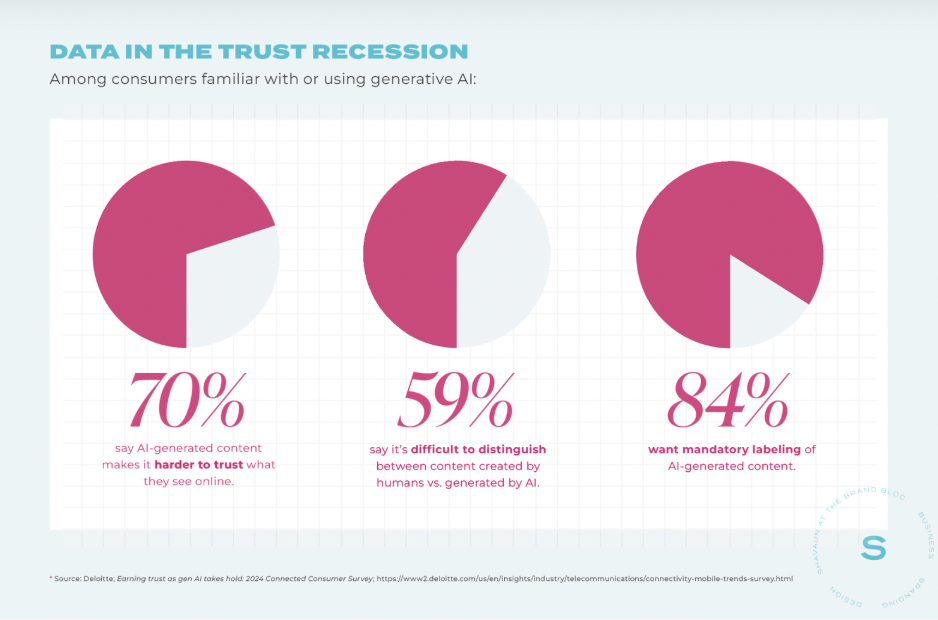
Source: https://shavaun.com/trust-recession-guide/
NO TRUST = NO SALE.
Fact: People only buy from those that they trust.
If you want to build, grow & sustain a business in this climate of consumer distrust, then you need to invest in marketing strategies that actually help you to connect authentically with your audience, and build that all important like, know and trust factor.
For this, I believe that a beautiful & effective website is an absolute MUST.
WHY?
Because a website that works (A.K.A it actually converts your viewers into loyal paying clients) is strategically designed to take them on an epic trust building journey that finishes with them clicking and happily investing in your services.
If you don’t have a website (& will soon be building one) OR if your current website is kinda janky, outdated, not converting (& is in desperate need of a makeover) then...
YOU ARE IN THE RIGHT PLACE!!
Without further ado, let’s jump into the first part of this series and the first 3 steps to create clickworthy website content that converts.
PART 1 - Gaining clarity and creating a solid foundation:
Yes, just like a house, your website needs a sturdy foundation and it’s called CLARITY.
A website without a solid foundation/clarity will lack a sense of cohesiveness, will take wayyy longer to build and will feel like a confusing HOTMESS to visitors when they land on it.
However, once you work through this foundational planning process that I’m going to lay out in the rest of this blog post, it will be instantly clear to your website visitors:
That YES they are absolutely in the right place when they land on your website.
What you do & how you can help them
The specific action they need to take next to solve their problem. (Spoilert: it’s click here & download this resource/pay me to fix your life)
The result?
Less of your people getting lost in the interwebs matrix and a much higher conversion rate overall, which also means more eyes on your work, more client inquiries in your inbox, more money in your bank AND more impact created in the world - huzzah!!
Let’s go…
Step 1: Take the time to get clear on your website goals & plan out your User-Experience (UX) Journey.
A website without a pre-planned UX journey will lack clarity, take longer to build and will inevitably feel like a confusing HOTMESS to visitors when they land on it. (oh hey skyhigh bounce rate!)
Once you work through this foundational planning process, it will be instantly clear to your website visitors that YES they are absolutely in the right place when they land on your website, and it will be super easy for them to take the next right step for them.
Ultimately, this will lead to less of your people getting lost in the interwebs matrix and your website will boast a much higher conversion rate overall (plus, you’ll have more client inquires in your inbox and more money in your bank woot!).
Here’s how to do it:
Before you start building your website, you need to get clear on what you want your website to actually DO for your business overall and what you want your viewers to do on each page.
Do you want to:
Grow your email list?
Book more discovery calls & sell more 1:1 client sessions?
Drive more traffic to your passive digital products?
Enroll more members into your online community?
Or something else?
ACTION STEP: Create a primary and secondary goal (& potentially a tertiary goal) for your website overall, eg:
Primary - To book more discovery calls/sell more 1:1 sessions
Secondary - To build email list
Tertiary - optional.
Getting clear on your site goals will help you immensely with deciding on the next part of the planning process - building your site UX journey.
But first, what is a User-experience (UX) Journey?
Essentially this is a map that showcases the steps that a user will take on your website to achieve a certain goal, eg: book a discovery call.
It is important to remember that a website is a form of media that is meant to be USED, and we can pre-plan the specific journey you want to take your website visitors on to achieve the desired goal.
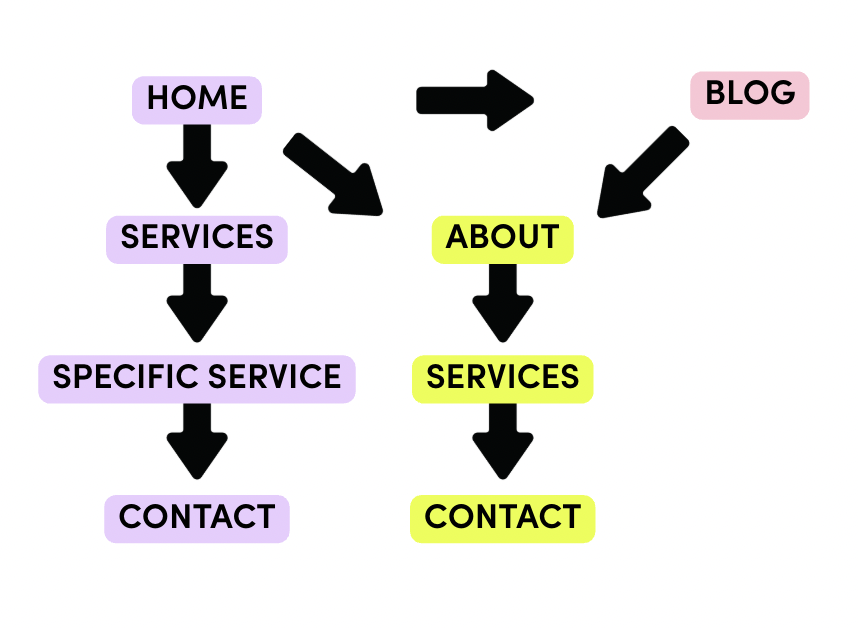
Ask yourself this question:
Q: What is the most likely path people will take to achieve [your chosen goal]?
You can strategically choose the path you want them to go & place specific CTA’s that guide them along that path.
ACTION STEP: Plan out your user-experience roadmap!
a) Decide on the pages your website needs.
Ask yourself: what information does my ideal client need to know before buying? What pages will provide that information? (PS: Home, About + a Services page is pretty standard but you can have more pages depending on your needs & goals).
b) Write out the ideal route that they will take (this is the one with the least friction) eg: Home > Contact (they book a call here) OR the (more likely) route could look like this Home > Services > Contact
For each page, decide on what the PRIMARY CTA (call-to-action) needs to be to get them from A-B with the least friction possible.
EG: With the above example, my goal is to get them to book a discovery call via my contact page. My Primary CTA for my home page may be: “Book discovery call” which will then link directly to the contact page. I’d also have another secondary CTA on my homepage that directs that to the Services page eg: “Browse Services.”
Making sense? Awesome, let’s move on.
STEP 2: Complete SEO keyword research (Hello free Google traffic & more visibility!!)
What are SEO keywords and why are they important?
The term “SEO” stands for ‘Search Engine Optimisation’ which basically means optimising your website to be found by search engines like Google. The more optimised your website is for SEO, the more likely you are to rank on page 1 in search results for specific keywords which would mean gaining a lot more organic traffic to your website - for free!
Let’s be real for a sec - SEO is a total rabbit-hole and if you want to rank in Google, then you will need to jump down that hole (much like Alice) and commit to doing all the things required to achieve that goal.
What I’m sharing with you today is just the BEGINNING of optimising your website for SEO but it is definitely worth doing, especially if you plan on going down the SEO rabbithole at some point in the future.
ACTION STEP: Brainstorm the specific keywords your ideal client would search for in Google to find you:
eg: For me, I know that my ideal client is likely looking for a web designer that specialises in Squarespace so my main keyword is: “Squarespace web designer” or “Squarespace web design”
You can also think about the keyword they would use to describe themselves & their interests.
eg: For me, I want to work with online coaches, service providers and digital entrepreneurs so I use those keywords on my website too.
Bonus tip: If you are a business that works with people from a specific location, using a keyword to target your local area would also be a great move.
Get some keyword inspiration in these places:
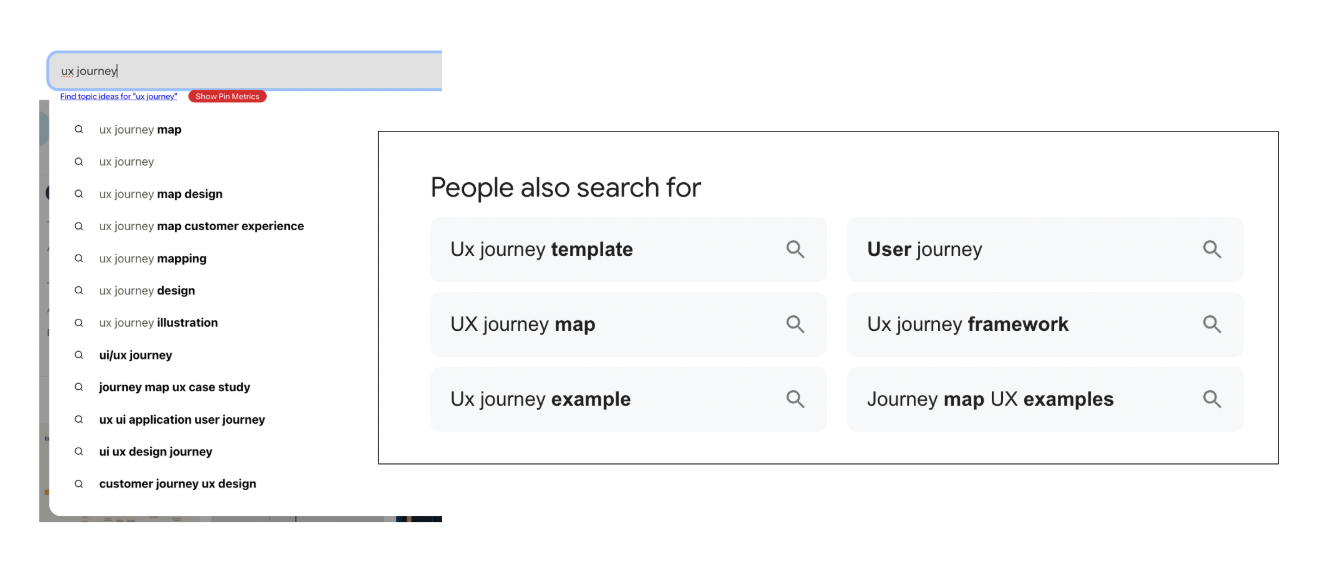
Soovle - https://www.seo.com/soovle/ - search for different keyword ideas across multiple search engines.
Pinterest search bar - type in your keyword and see what other long-tail keywords pop up.
Google related keyword search - enter a keyword and scroll down to the bottom of the search results to see other keyword ideas
FYI: It’s important to choose keywords that have a low competition rate. Here’s how to identify the best ones using the Google Keyword planner:
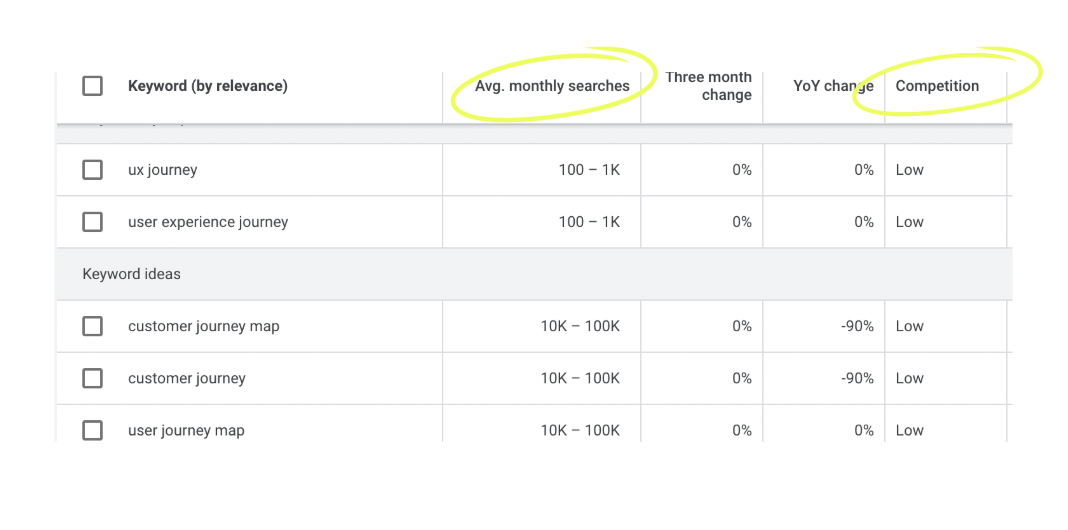
a) Go to the Google keyword planner tool & click on “Discover new keywords”
b) Input the keyword you want to research and choose the location you want to target. (ie: global or you may just want to target people in New Zealand.)
c) Look at the Avg monthly searches & competition level - you want keywords ideally with 100-1K searches & Low comp.
Note: You can also go for low comp keywords with a higher search volume BUT it will still be harder to rank/get on page 1. The lower search keywords give you a much higher change of ranking which is the goal.
Here are some keyword pointers and where to put them on your website:
Ideally, choose 1 different but related keyword per page. For example, these may be how I approach the keywords on my website:
Home - “Squarespace web design”
About - “Web designer”
Services - “Custom web design services.”
Put them in the following places:
1 time in the H1 heading at top of page
2-3 times in H2 headings & body text on same page
1 time in the URL page slug eg: makeoveryourwebsite.co/custom-web-design-services (also be sure to use a hyphen between words - this helps Google)
1 time in the page name (via page settings)
Variants in the image/video file names.
Bonus tip: Definitely DON’T keyword stuff. You don’t have to go mad, but aim to work them into your copy & these different places intentionally.
STEP 3: Create a badass brand identity that stands out:
Firstly, what is branding, and why is it essential for your website and general online presence?
Branding is the process of creating a unique brand identity that will grab the attention of your viewers and then will effectively communicate why YOU are the best/only choice for them.
An effective brand will help you to differentiate yourself from the crowd and standout - you will become the hot pink flamingo in a sea of grey flamingos.
Your brand is what will magnetise your DREAM ideal clients into your world and will help you talk directly to them. They’ll be thinking: “OMG, it’s like she’s in my head!!” Is it magic? It may seem like it but actually, it’s the power of your brand strategy.
Branding is about so much more than just choosing your colours, fonts & creating a logo.
Your brand is all about what you stand for, believe in and the RIPPLE EFFECT you want to create in the world around you via your work.
Your brand is all about the FEELING and the EXPERIENCE your client gets from interacting with you, your content & your services.
Your brand is your ultimate REPUTATION - it is what others are saying about you and your work when you are not listening.
Branding is also how you cultivate that much needed sense of trust with your audience & potential clients.
This sense of trust is created via the consistency & clarity in your messaging & visual brand elements that work cohesively together to communicate your overall fabulousness.
When you engage in a branding process, you will consider all of the following elements of your brand:
Values - what’s important to you & your biz?
Tone words- the words that describe your brand
Difference - your expertise & how you differentiate yourself
Niche & ideal client - who you are speaking to
Promise - the result you promise via your services
Voice - the tone of voice & type of words you use to communicate
Visual style - and of course, the colours, fonts, images & graphics.
ACTION STEP: Choose 3 tone words that describe your brand & decide on what they mean for your brand.
eg: For my brand Makeover Your Website, my 3 brand words are:
Empowered - I want to empower my clients to create a successful business on their terms, not someone else’s; being bold & taking risks; a celebration of going against the grain & being a little unconventional/rebellious.
Beautiful & effective - I’ve used a phrase here because I believe it is important to have a website that looks beautiful but is ALSO effective - otherwise what’s the point?
Fun - I want to turn the often overwhelming process of building a website into something easy and joyful; I want to help my clients (and myself!) have more fun along the way as they build, grow & scale their business!
Your brand tone words will then become your guiding compass for every single part of your business:
Your visual & verbal brand elements
Your website & social content
Your services & offerings
Even the decisions you make behind the scenes should all be in honour of your brand words!
ACTION STEP: Create a brand style moodboard inspired by your brand words.
Now you’ve done all that hard work behind-the-scenes, it’s time for the *really* fun part...translating your brand information into your verbal & visual style! This is the part where we bring your brand to LIFE and make magic happen - woot!
Watch this bonus video walk-through of this process - click on the image to watch ;)
>>> FREE DOWNLOAD <<<
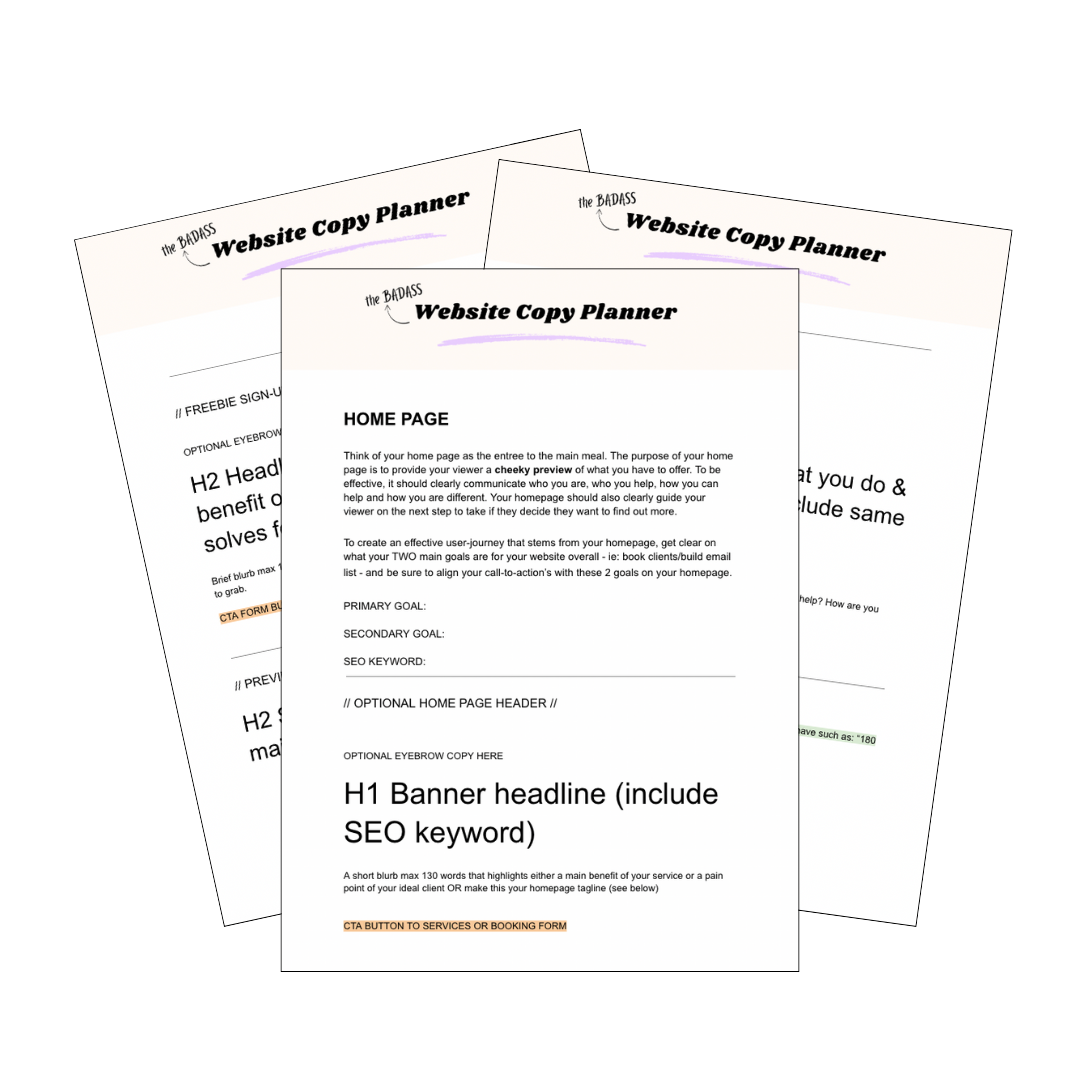
Grab your free Badass Homepage Copy Planner here!
Writing copy (that *actually* converts) for your website can be a super hard and overwhelming task that can keep you stuck & spinning your wheels for a loooong ass time!
I learned this lesson the hard way, but luckily for you - you don’t have to!
Download the Badass Homepage Copy Planner to strategically plan the copy for one of the most important pages of your website: your homepage!
Your website (and your bank account) will thank you!